Renovate in GitOps Environments

Introduction
GitOps has become a common way of managing Kubernetes environments.
The idea is simple: Git is the source of truth. The desired state of the platform is stored in a repository, and tools like Argo CD or Flux continuously reconcile that desired state to the cluster.
This gives teams a controlled and auditable deployment model. Every change goes through Git. Every change can be reviewed. Every change can be traced.
But GitOps does not automatically solve dependency management.
Container images still become outdated. Helm charts still release new versions. GitHub Actions still need updates. Terraform providers and modules still move forward. Security fixes still need to be applied.
Without automation, someone still needs to manually check all these versions.
That is where Renovate fits in.
Renovate scans repositories for dependencies and creates pull requests when updates are available. In a GitOps environment this works especially well, because updates are proposed as normal Git changes. The team can review the pull request, CI can validate it, and after merge the GitOps controller can deploy the new desired state.
Why dependency updates are hard at scale
For a single application, manually updating dependencies might not feel like a big problem.
But platform teams usually do not manage one application. They manage multiple repositories, multiple environments, multiple clusters and multiple teams.
That means dependency management quickly becomes operational work.
Think about questions like:
- Which container images are outdated?
- Which Helm charts need to be updated?
- Which updates contain security fixes?
- Which major updates need extra attention?
- Which repositories are using old GitHub Actions?
- Which teams are falling behind on maintenance?
The challenge is not just updating a version number.
The challenge is doing it consistently, safely and repeatedly across many repositories.
Renovate helps by turning dependency updates into a standard pull request workflow.
The GitOps update flow
A typical GitOps workflow with Renovate looks like this:
  graph TD;
    A[New dependency version released] --> B[Renovate detects update];
    B --> C[Renovate creates pull request];
    C --> D[CI validates the change];
    D --> E[Engineer reviews and merges];
    E --> F[Argo CD or Flux syncs the change];
    F --> G[Kubernetes runs the updated version];
This creates a clean separation of responsibilities.
Renovate proposes the change. CI validates the change. The team reviews the change. GitOps deploys the change.
That makes dependency updates visible and auditable.
Demo repository
To make this practical, I created a small demo repository:
https://github.com/jeroenvandelockand/renovate-gitops
The goal of the demo is to show Renovate updating different types of GitOps dependencies:
- a container image in a Kubernetes manifest
- an image tag in a Helm
values.yamlfile - a Helm chart version in an Argo CD
Application - a GitHub Action version in a workflow
The repository contains a small GitOps style structure:
renovate.json
.github/
  workflows/
    renovate.yml
gitops/
  argocd/
    nginx-application.yaml
  k8s/
    deployment.yaml
  helm/
    podinfo/
      values.yaml
The example is intentionally small. The point is not to deploy a production application. The point is to make the Renovate workflow visible and easy to understand.
Renovate configuration
The Renovate configuration lives in the root of the repository.
{
  "$schema": "https://docs.renovatebot.com/renovate-schema.json",
  "extends": [
    "config:recommended",
    ":dependencyDashboard"
  ],
  "labels": [
    "dependencies",
    "renovate"
  ],
  "argocd": {
    "managerFilePatterns": [
      "/^gitops/argocd/.+\\.ya?ml$/"
    ]
  },
  "kubernetes": {
    "managerFilePatterns": [
      "/^gitops/k8s/.+\\.ya?ml$/"
    ]
  },
  "helm-values": {
    "managerFilePatterns": [
      "/^gitops/helm/.+/values\\.ya?ml$/"
    ]
  },
  "packageRules": [
    {
      "matchManagers": [
        "argocd",
        "kubernetes",
        "helm-values"
      ],
      "groupName": "GitOps dependencies"
    },
    {
      "matchUpdateTypes": [
        "major"
      ],
      "dependencyDashboardApproval": true
    }
  ]
}
There are a few important choices here.
First, the configuration extends config:recommended. This provides a good baseline configuration.
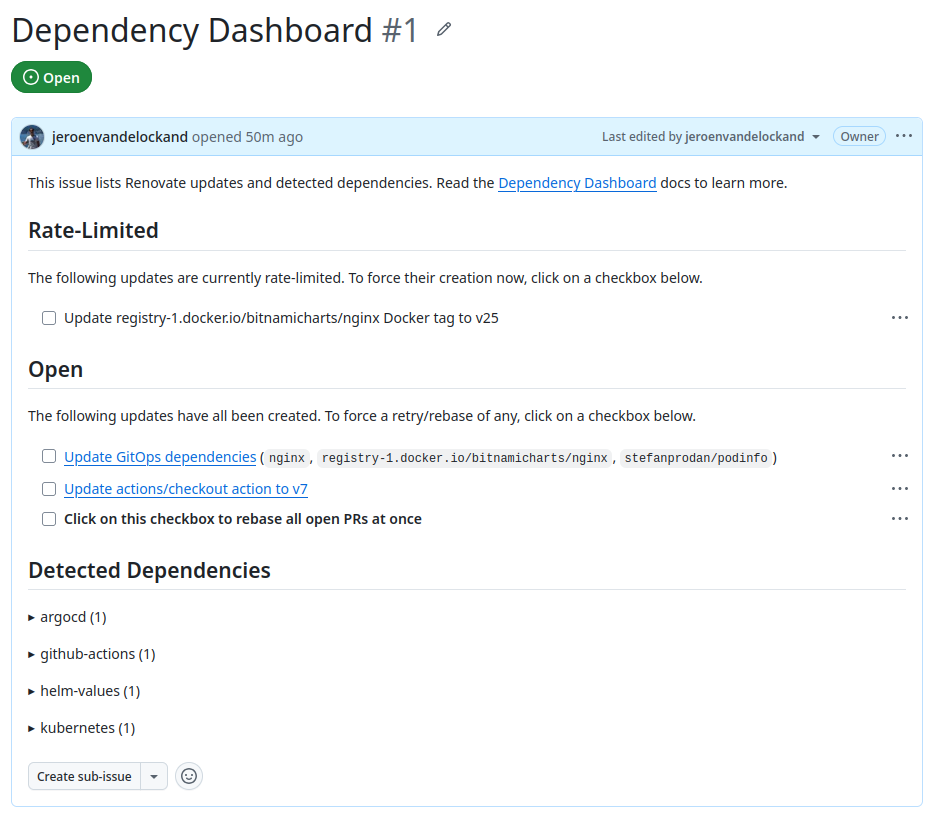
Second, the Dependency Dashboard is enabled. This gives a central overview of detected updates and updates that require approval.
Third, explicit file patterns are configured for the GitOps examples. This tells Renovate where to look for Argo CD, Kubernetes and Helm values files.
Fourth, GitOps related updates are grouped together. This keeps the demo clear, because Renovate creates one pull request for the GitOps dependency updates.
Finally, major updates require approval through the Dependency Dashboard. This is useful because major updates often require more review than patch or minor updates.
Running Renovate with GitHub Actions
For the demo, Renovate is triggered manually through GitHub Actions.
name: Renovate

on:
  workflow_dispatch:

jobs:
  renovate:
    runs-on: ubuntu-latest

    steps:
      - name: Checkout
        uses: actions/checkout@v6

      - name: Run Renovate
        uses: renovatebot/[email protected]
        with:
          token: ${{ secrets.RENOVATE_TOKEN }}
        env:
          RENOVATE_REPOSITORIES: ${{ github.repository }}
          RENOVATE_PLATFORM: github
          LOG_LEVEL: debug
This makes the demo easy to run.
Instead of waiting for the hosted Renovate app schedule, I can go to GitHub Actions and manually start the workflow.
The repository needs a GitHub token stored as an Actions secret:
RENOVATE_TOKENWhen the workflow runs, Renovate scans the repository, checks the dependencies and creates pull requests when updates are available.
Example 1: Updating a Kubernetes container image
The first example is a simple Kubernetes Deployment.
apiVersion: apps/v1
kind: Deployment
metadata:
  name: renovate-demo
  namespace: renovate-demo
spec:
  replicas: 1
  selector:
    matchLabels:
      app: renovate-demo
  template:
    metadata:
      labels:
        app: renovate-demo
    spec:
      containers:
        - name: nginx
          image: nginx:1.27.0
          ports:
            - containerPort: 80
The dependency here is the container image:
image: nginx:1.27.0Renovate detects that the image tag is outdated and creates a pull request to update it.
In the demo, Renovate proposed this update:
-          image: nginx:1.27.0
+          image: nginx:1.31.2
This is a common GitOps use case.
The desired version of the workload is stored in Git. Renovate proposes the new version. After review and merge, the GitOps controller can apply the change to the cluster.
Example 2: Updating Helm values
The second example uses a Helm values.yaml file.
image:
  repository: stefanprodan/podinfo
  tag: 6.6.0
This pattern is common when teams manage application versions through environment specific values files.
For example:
environments/
  dev/
    values.yaml
  test/
    values.yaml
  prod/
    values.yaml
Renovate detects the image repository and tag, then proposes a version update.
In the demo, Renovate proposed this update:
 image:
   repository: stefanprodan/podinfo
-  tag: 6.6.0
+  tag: 6.14.0
This makes image updates visible through pull requests instead of hidden manual edits.
Example 3: Updating an Argo CD application
The third example is an Argo CD Application that references a Helm chart.
apiVersion: argoproj.io/v1alpha1
kind: Application
metadata:
  name: nginx-demo
  namespace: argocd
spec:
  project: default
  source:
    repoURL: registry-1.docker.io/bitnamicharts
    chart: nginx
    targetRevision: 15.9.0
  destination:
    server: https://kubernetes.default.svc
    namespace: nginx-demo
  syncPolicy:
    automated:
      prune: true
      selfHeal: true
The important field is:
targetRevision: 15.9.0Renovate detects the Helm chart version and proposes an update.
In the demo, Renovate proposed this update:
-    targetRevision: 15.9.0
+    targetRevision: 15.14.2
This is where Renovate and GitOps work nicely together.
The Helm chart version is updated in Git. The pull request shows what changed. After merge, Argo CD can sync the updated chart version to the cluster.
Example 4: Updating GitHub Actions
Renovate can also update GitHub Actions workflows.
The demo workflow uses:
uses: actions/checkout@v6Renovate detected a newer major version and created a separate pull request:
-        uses: actions/checkout@v6
+        uses: actions/checkout@v7
This is useful because CI/CD workflows are also dependencies.
If the pipeline is part of the delivery platform, it should be maintained like any other dependency.
The Dependency Dashboard
One of the useful Renovate features is the Dependency Dashboard.
The Dependency Dashboard is created as a GitHub issue. It gives an overview of detected updates, pending pull requests and updates that require approval.
In this demo, the first visible result was the Dependency Dashboard issue.
At first, it looked like Renovate was only creating an issue and no pull request. But that was because a major update required approval.
After approving the update and running Renovate again, Renovate created the pull requests.
This is an important lesson: the Dependency Dashboard is not an error. It is part of the workflow, especially when approval rules are configured.
The result
After running Renovate, the demo repository showed two pull requests:
Update GitOps dependenciesUpdate actions/checkout action to v7
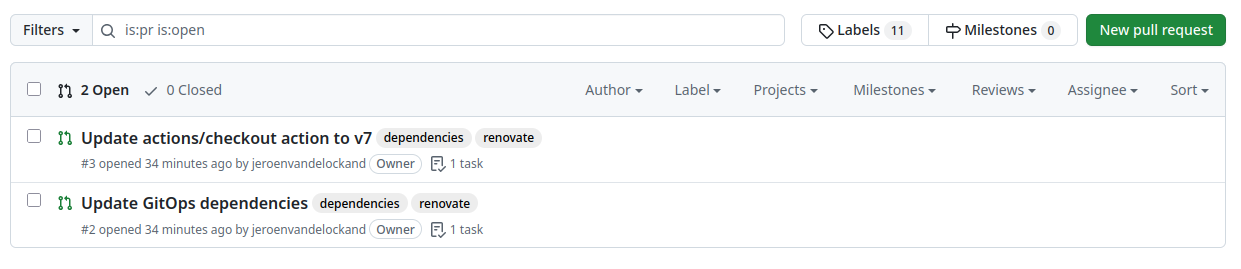
The GitOps pull request updated three files:
gitops/k8s/deployment.yaml
gitops/argocd/nginx-application.yaml
gitops/helm/podinfo/values.yaml
The pull request contained the proposed version changes and release information.
That is the core value of Renovate in a GitOps environment.
It turns version drift into reviewable pull requests.
Why this matters for platform engineering
From a platform engineering perspective, Renovate is more than a dependency update tool.
It helps create a standard operating model for dependency maintenance.
Without a standard approach, every team solves dependency updates differently. Some teams update frequently. Some teams only update when something breaks. Some teams do not know which versions they are running.
That creates risk and inconsistency.
With Renovate, the platform team can offer a paved road:
Repository standards
        +
Renovate configuration
        +
Pull request workflow
        +
CI validation
        +
GitOps deployment
        =
Controlled continuous updates
This reduces manual work and makes updates visible.
It also helps teams avoid large upgrade moments where months of dependency changes need to be handled at once.
Small, continuous updates are easier to review than large, delayed upgrades.
Conclusion
Dependency management is one of those tasks that is easy to underestimate.
In Kubernetes and GitOps environments, dependencies are everywhere:
- container images
- Helm charts
- Argo CD applications
- GitHub Actions
- Terraform modules
- application packages
Renovate helps by making these updates visible and manageable.
Instead of manually checking versions, teams receive pull requests. Instead of large upgrade projects, teams review smaller changes continuously. Instead of hidden version drift, teams get an auditable workflow.
For small teams, Renovate saves time. For platform teams, it creates consistency. For security teams, it improves response time. For operations teams, it reduces risky upgrade moments.
That makes Renovate a strong addition to a modern GitOps and platform engineering workflow.
The demo repository is available here:
https://github.com/jeroenvandelockand/renovate-gitops
If you want to engage with us regarding your platform automation challenges, please reach out to Iliass Laghmouchi or Mark Dudock, our account managers at Conclusion Xforce.