Kubecon 2026 relived

Introduction
I like big conferences: you can get a lot of knowledge in a very short time. During the Kubecon conference in Amsterdam in March 2026, I maintained a list of what I wanted to learn after the conference. In the weeks after Kubecon, I tried to recreate the examples in the AWS play environment. In this case: a vanilla implementation of Kubernetes with one control node and two worker nodes. In this blog some of the lessons I learned.
You can deploy the examples in your own AWS environment as well, this is
the link to the repository
Go to the aws-deployment directory, copy the setenv.template.sh file to
setenv.sh and change the values in the file. Then start the environment
with
bash login.sh
bash start-k8s.sh
You can delete the environment by
bash stop-k8s.sh01 - Gateway API instead of Ingress
It was an official moment in the Kubecon presentation: the archival of the ingress-nginx repository. We now should migrate to the new Gateway API implementations. There are two tools that can help you: the first one is called ingress2gateway and it can help you in migrating the current ingress-nginx implementations to a Gateway API implementations. The second one is an implementation wizard: when you don’t know which implementation support which features you can click on the features that you must have, or which ones are nice to haves, and then a list of tools that support these features comes up.
In the talk “Gateway API: Bridging the Gap from Ingress to the Future” ( slides, video) the presenters showed both the way of working with new ListenerSets, TLSRoutes in both Terminate and Passthrough mode, mTLS, HTTP2 Connection coalescing and the Gateway client certificate selection API.
In my example repository I have examples for the new ListenerSet and the two ways of working with TLSRoutes.
02 - Refresh secrets
The ArgoCD team gets a lots of questions to implement support for secrets in the ArgoCD environment. They don’t want to implement it, because secrets should be kept in a vault (f.e. Hashicorp Vault, Azure KeyVault, AWS Secrets Manager, etc). When the password changes, the External Secrets Operator will keep the secret in Kubernetes up-to-date automatically. As an developer, you can use libraries like fsnotify (for go) or watchdog (for python) to check if a file is changed. For other programming languages see slide 26 of the talk " GitOps and Secrets:State of the Union “. The presenter, Kostis Kapelonis, also created a simple repository to show how this works.
I implemented his solution in my own environment as well.
03 - Refresh secrets AWS
With my background in AWS, I liked to know how this worked with secrets in AWS. I liked the idea of automated change of secrets a lot, so I woundered if something like this would exist for parameters as well. I would like to get an operator that “translates” AWS SSM parameters to ConfigMaps. Unfortunately this doesn’t exist (yet), but you can use External Secrets Operator to translate SSM parameters into Kubernetes secrets. Which might be somewhat confusing.
In the example repository you will find both examples for External Secrets Operator connections with AWS Secrets Manager and with SSM Parameter Store.
04 - Crossplane
Learning Crossplane
The External Secrets Operator can be used to get secrets and parameters from AWS into Kubernetes. But it can be done the other direction as well: we can add SSM parameters and secrets from Kubernetes to AWS. This might be done via Crossplane. I saw the video on the crossplane website before the conference, but didn’t have time to look into it further.
The talk on the conference (” Crossplane - The Cloud Native Framework for Platform Enginering" then went a little bit too fast for me… When I was home I took more time to look into it more properly: I first followed the demos on the Crossplane site and put the files in my example repository.
Creating SSM parameters and secrets
When I created crossplane objects for an SSM parameter and a secret, there are some differences in the way Crossplane deals with these objects. The way that Crossplane refers to AWS objects is also different: for SSM parameters this works via annotations:
apiVersion: ssm.aws.m.upbound.io/v1beta1
kind: Parameter
metadata:
  name: crossplane-demo-parameter
  annotations:
    crossplane.io/external-name: /kubecon26/examples/04-crossplane/demo-parameter
spec:
  forProvider:
    type: String
    insecureValue: hello-from-crossplane
    region: eu-west-1
For secrets, this is via a (Kubernetes) secret name parameter in forProvider:
apiVersion: v1
kind: Secret
metadata:
  name: crossplane-demo-secret-value
  namespace: default
type: Opaque
stringData:
  secret-string: '{"demo":"hello-from-crossplane"}'
---
apiVersion: secretsmanager.aws.m.upbound.io/v1beta1
kind: Secret
metadata:
  name: crossplane-demo-secret
spec:
  forProvider:
    name: kubecon26/examples/04-crossplane/demo-secret
    description: Demo secret created by Crossplane
    region: eu-west-1
---
apiVersion: secretsmanager.aws.m.upbound.io/v1beta1
kind: SecretVersion
metadata:
  name: crossplane-demo-secret-version
spec:
  forProvider:
    region: eu-west-1
    secretIdRef:
      name: crossplane-demo-secret
    secretStringSecretRef:
      name: crossplane-demo-secret-value
      key: secret-string
This leads to:
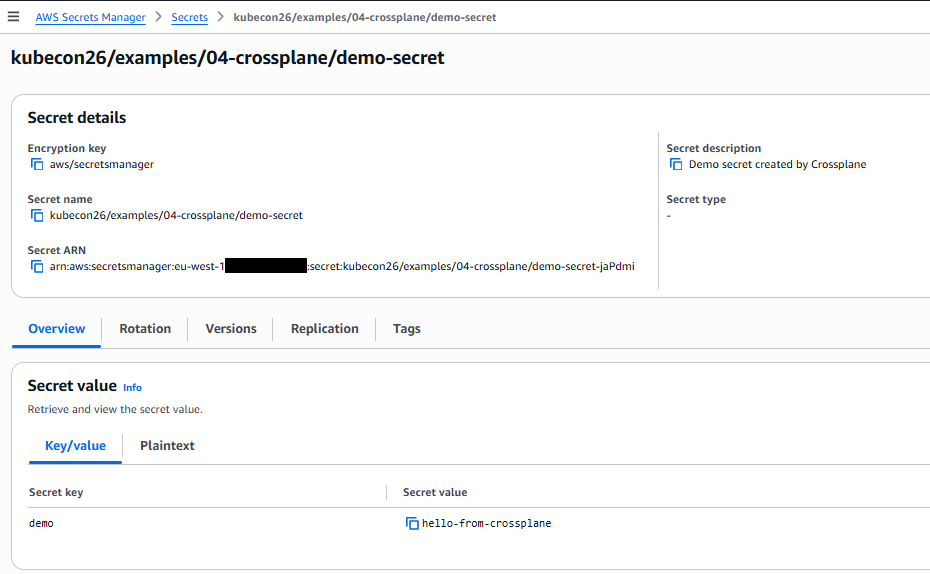
It would be better to use one way-of-working for this within Crossplane.
When you use the newest versions (on the time of writing this blog), it is not possible to put values in SecureStrings in SSM parameters or in SecretValues in secretsmanager. These have to be pulled from a kubernetes secret. The Kubernetes secret for the SSM parameter can be put in the namespace of the application, the secret for secretsmanager should be in the default namespace (which is not what one would expect when one deploys the solution).
When you delete a secret and then recreate it, you might get an error message that says:
failed to create the resource: [...] creating Secrets Manager Secret
(kubecon26/examples/04-crossplane/demo-secret): operation error Secrets
Manager: CreateSecret, https response error StatusCode: 400, RequestID:
1ab23456-7890-1cde-fgh2-34i5678jkl9m, InvalidRequestException: You can't
create this secret because a secret with this name is already scheduled
for deletion.
This can be solved by using the AWS CLI:
aws secretsmanager delete-secret \
  --secret-id kubecon26/examples/04-crossplane/demo-secret \
  --force-delete-without-recovery \
  --region eu-west-1 \
  --profile your-profile
Crossplane CLI
I then tried to follow along with the Kubecon demo in this repository, but the PR was already merged and some commands were different than those in the repository. I could follow along using the following commands on the control node of my AWS kubecon26-example-repo:
Setup
# This commands are done for you
cd /clone
git clone https://github.com/crossplane/cli

cd /clone/cli
go install ./cmd/crossplane
PATH=$PATH:/home/kubernetes/go/bin
Demo Script
You can follow along with the rest of the demo, executing
crossplane project init hello-amsterdam && cd hello-amsterdamfrom the ~/kubernetes directory.
In step 7, use v1.34.0 instead:
crossplane dependency add k8s:v1.34.0
echo
echo "Here's what crossplane-project.yaml looks like after adding the dependency:"
echo
cat crossplane-project.yaml
In step 10, don’t use the –crossplane-version argument:
crossplane composition render --timeout=10m examples/webapp/podinfo.yaml apis/webapps/composition.yamlIn step 14, use curl instead of open:
kubectl port-forward svc/$(kubectl get svc -l crossplane.io/composite=podinfo -o jsonpath='{.items[0].metadata.name}') 9898 >/dev/null 2>&1 &
curl http://localhost:9898
It was very nice to see that using crossplane is made easier by just having to add the relevant code and let the crossplane CLI do the rest.
05 - OpenTelemetry
In Kubernetes services can be slow, which can be cause by calls to the DNS. I liked the talk about " DNS Tracing and Metrics Via eBPF in OpenTelemetry “. Sometimes the slowness is not caused by the DNS server, but by the DNS clients: maybe by not using the FQDN of the server. But where does this happen?
We can find out by using OpenTelemetry eBPF Instrumentation (OBI). Both metrics and spans are supported. I added the configuration for eBPF and OpenTelemetry in the example repository.
You can look at the dashboard DNS Requests (eBPF) for DNS requests within this cluster.
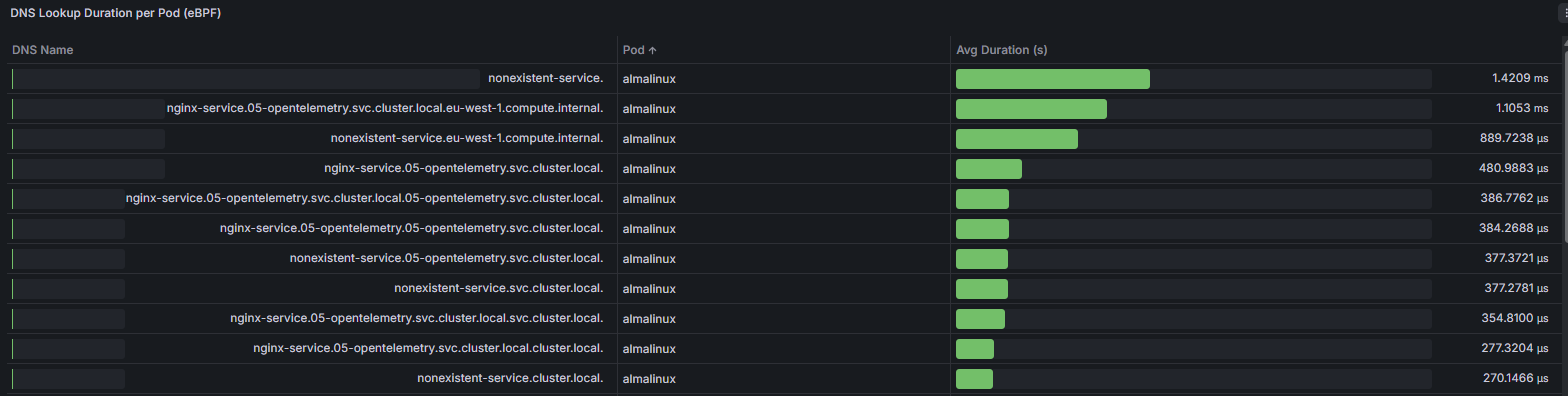
I was a little bit surprised that the DNS requests were not visible in the same
way as in the Kubecon presentation. The reason was, that both Python and (the
current implementation of) go have libraries that add search paths to the URL
when no dots are present. The first search path to add is
05-opentelemetry.svc.cluster.local, which is the correct one for
my service.
I changed the script a little bit to add different paths. This is the result:
06 - Policy Engines
One of the nice things of Kubecon is that some presentors give overviews of different solutions for the same problem. The presentation Policy Engines for Kubernetes: Picking One Without Losing Your Mind by Naburan Pal did just that. He did a great job of showing code, advantages and disadvantages of four policy engines: ValidatingAdmissionPolicies, Kyverno, OPA/Gatekeeper and Kubewarden.
I implemented three of four in my example repository: Kubewarden is used less in the community and has a different architecture so I left this one out.
Conclusion
It helped me to play with knowledge I learned from conferences like Kubecon. You can do as well, by using the example repository.
Have fun!